
Jobber + QuickBooks Online, reviewed line by line before export.
- Import Jobber invoices into one review workspace.
- See totals, balances, taxes, and mappings — and fix the draft before anything posts.
- After export, HVAC Bridge verifies what QuickBooks actually recorded matches what you approved.
14-day free trial of Team features. No credit card required.
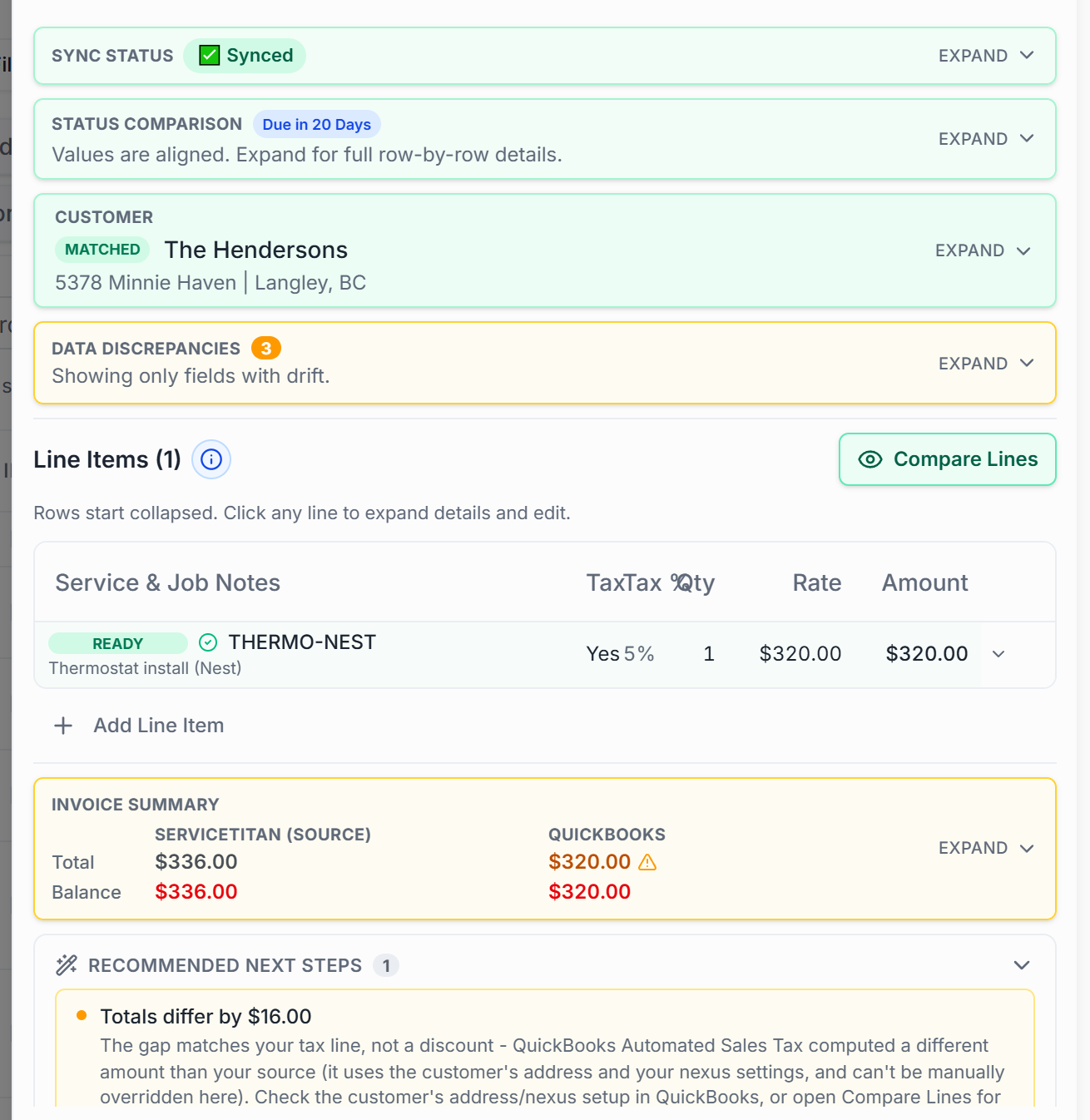
Sound familiar?
Jobber and QuickBooks should tell the same story.
A field-service invoice can look finished while the accounting behind it is incomplete or mapped differently. That gap is where month-end cleanup comes from.
- A quote becomes a job becomes an invoice — and by the time it reaches QuickBooks, the numbers have had three chances to drift.
- Payments collected through Jobber don't always match what your books say was collected.
- Re-keying invoices into QuickBooks means every field is another chance for the two systems to disagree.
How it works
A checkpoint between Jobber and your books.
Connect Jobber
Connect with your Jobber login — a standard OAuth authorization, no API keys to copy.
Review & audit
Every invoice lands as a draft with named checks against what QuickBooks has. Fix the lines, mappings, and taxes that need it.
Export & verify
Export the approved version — then HVAC Bridge compares what QuickBooks actually recorded against what you approved, and flags any gap.
Line by line
Every invoice, against a named list — not a vibe.
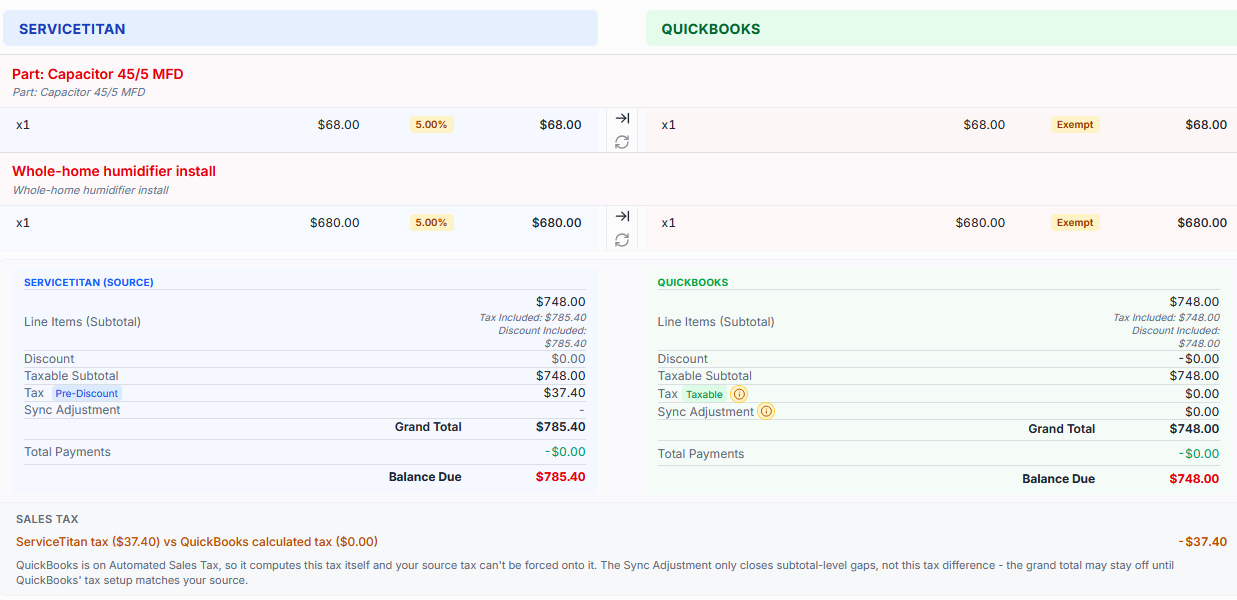
Each imported invoice is compared against what QuickBooks has, check by check, with the disagreeing value shown in red:
- Totals
- Balance
- Tax mapping
- Customer match
- Invoice number
- Due date
- Payment gap
- Billing status
- Pending edits
What's included
The Jobber connection, specifically.
Connectors differ — this is what this one does. No feature listed here is shared marketing copy; each maps to the Jobber integration as built.
- Invoice import from Jobber
- Customer matching
- Item matching
- Invoice-level tax review
- Payment records from Jobber
- Draft editing before export
- Named audit checks on every invoice
- QuickBooks export with post-export verification
- QuickBooks payment status written back to Jobber
- Daily scheduled import (Team)
Mappings
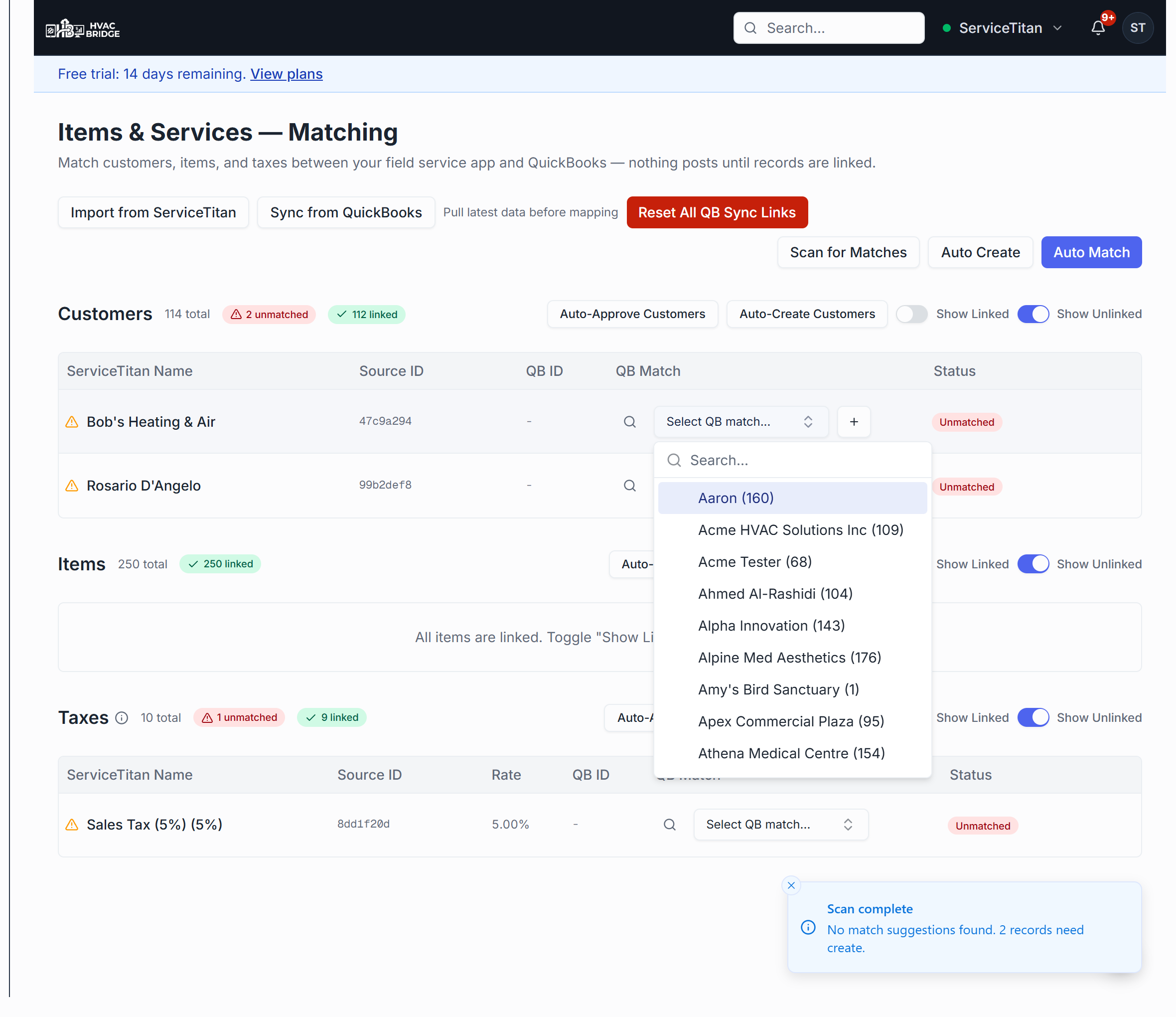
Mappings become visible work, not hidden assumptions.
Every customer, item, and tax behind an export is linked to a QuickBooks record you can see. Unmatched records are flagged, and nothing posts until they're resolved — by you, or in bulk.
A direct export moves data. That's not the whole job.
Sending an invoice straight from Jobber to QuickBooks gives you no checkpoint in between: no side-by-side review, no discrepancy flags, no draft to correct, and no verification of what QuickBooks actually recorded. HVAC Bridge is that checkpoint — audit, fix, approve, export, verify.
Plans
Start manual. Automate when you're ready.
Solo
$49/moYou trigger every import and export. Full review workspace, matching, draft editing, and post-export verification.
Team
$99/moAdds daily scheduled import, audit mode, and automatic posting — which is earned, not assumed: it unlocks after your first successful manual exports, and approval stays the default.
14-day free trial of Team features. No credit card required.
Questions
Does Jobber integrate with QuickBooks Online?
Yes — HVAC Bridge connects to Jobber over OAuth, imports invoices and their payment records, lets you review each one line by line, and exports the approved version to QuickBooks Online with a post-export verification.
How is tax handled?
Jobber reports tax at the invoice level, so HVAC Bridge reviews an invoice-level tax rate and flags any invoice where it disagrees with what QuickBooks calculates — before and after export.
Does anything go back to Jobber?
After an export, HVAC Bridge can write the QuickBooks payment status back onto the Jobber invoice as custom-field metadata (or a note), so your team can see in Jobber what has reached the books. It's optional and visible in your sync history.
What does it cost?
Solo is $49/mo and Team is $99/mo. Every new account starts with a 14-day free trial of Team features — no credit card required.
Also built for the rest of your stack — one review path across all of them.
Put a checkpoint between Jobber and QuickBooks.
Import your invoices, see the mismatches side by side, and export only what you've reviewed.
14-day free trial of Team features. No credit card required.