
For bookkeepers & accountants serving HVAC contractors
Stop untangling field invoices at month-end.
HVAC Bridge imports, checks, and stages every field-service invoice as a reviewable draft between your client's field app and QuickBooks Online — so you do accounting instead of detective work.
14-day free trial of Team features. No credit card required.
The month-end, with and without a checkpoint.
Field app → QuickBooks, unreviewed
- Chase the office for which jobs were actually invoiced this month.
- Eyeball field-app totals against QuickBooks, row by row, and hope nothing moved after you looked.
- Find the tax and mapping gaps at reconciliation — after they've compounded for weeks.
- Reconstruct what happened from two systems and somebody's memory.
With HVAC Bridge in between
- Invoices arrive in one review workspace, imported from the client's field app.
- Named checks flag the invoices that disagree — totals, balance, tax mapping, customer, invoice number, payment gap, status.
- You correct the draft and export the reviewed version; QuickBooks only sees what was approved.
- After export, the total QuickBooks actually recorded is verified against the approved total, and a sync history shows what moved and why.
The scenario this was built for
“Two line items are wrong. I don't know which two.”
Every bookkeeper with field-service clients knows the shape of this problem. The field app says one total. QuickBooks says another. The gap is small enough that everything looks almost right — and “almost right” is far harder to find than obviously broken. It could be a tax the two systems computed differently, a payment that landed as an unapplied credit, a line that never made it across.
Finding it by hand means opening both systems and comparing rows until something disagrees. HVAC Bridge does that comparison for you, on every invoice, and shows the disagreeing fields in red — so the hunt starts at the answer.
in·voice check·point
noun · accounting workflow
A review stage between a field-service app and QuickBooks Online where every invoice is compared, corrected, and approved before it posts.
In HVAC Bridge, the checkpoint runs nine named checks per invoice — and after export, verifies the total QuickBooks actually recorded against the total you approved. A gap of even one cent marks the sync partial until you've seen it.
Every client on a different field app. One review path.
ServiceTitan, Housecall Pro, Jobber, Zoho FSM, and Workiz all structure invoice data differently. The checkpoint is the same for all of them — same checks, same drafts, same export queue — so adding an HVAC client doesn't mean learning another workflow.
The audit view
Source and QuickBooks, side by side, flagged by name.
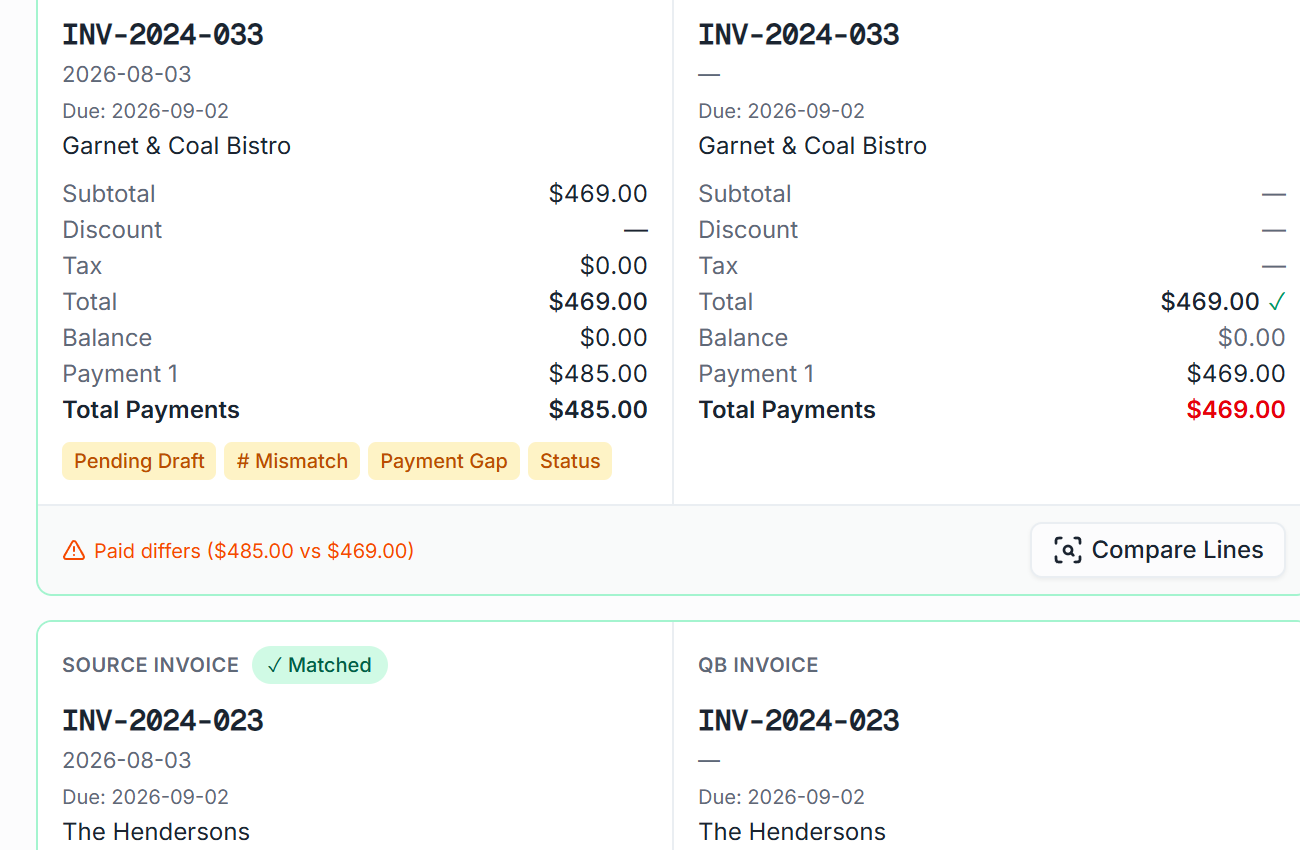
Every invoice shows the source version next to the QuickBooks version with its discrepancies labeled — a payment gap, a number mismatch, a pending draft — so review means working an exception list, not scanning everything.
Line by line
Every invoice, against a named list — not a vibe.
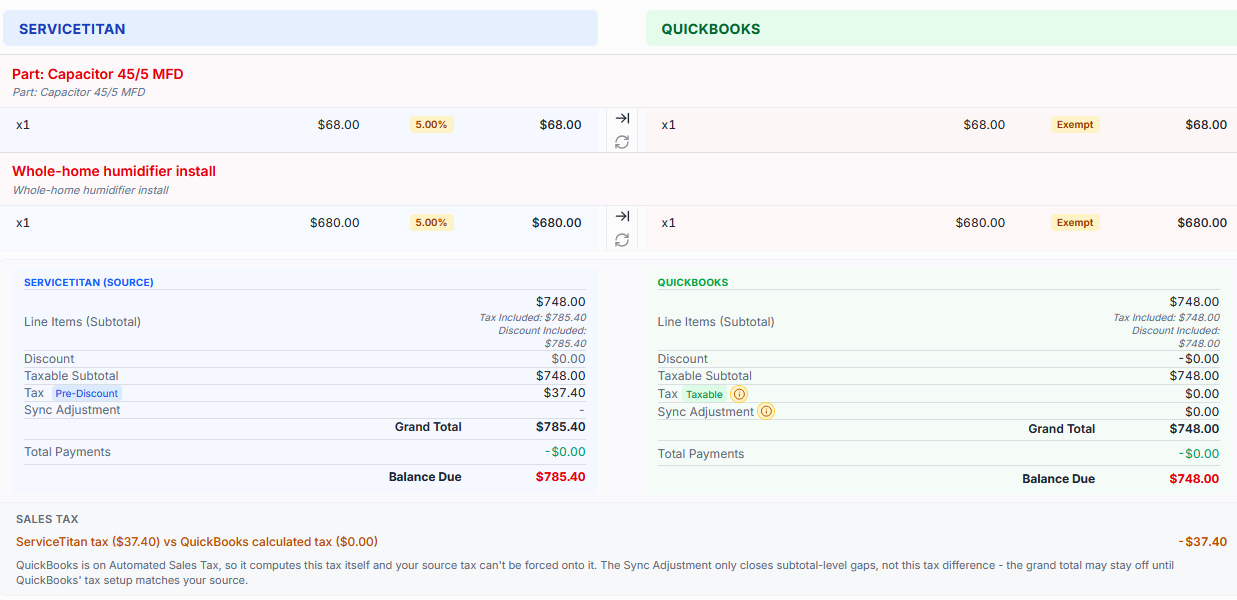
Each imported invoice is compared against what QuickBooks has, check by check, with the disagreeing value shown in red:
- Totals
- Balance
- Tax mapping
- Customer match
- Invoice number
- Due date
- Payment gap
- Billing status
- Pending edits
Who does what.
HVAC Bridge doesn't replace your judgment — it queues work for it.
HVAC Bridge
- Imports invoices, customers, items, and taxes.
- Runs the named checks and flags what disagrees.
- Verifies what QuickBooks recorded after every export.
- Keeps the sync history of what moved and why.
You
- Decide how each discrepancy should be resolved.
- Correct drafts and approve what posts.
- Resolve mappings once; they stay resolved.
- Turn on automatic posting only when you're ready — it unlocks after the first successful manual exports, and approval stays the default.
Make HVAC clients your easiest clients.
See the workflow on a 30-minute walkthrough — or start a trial on a client's books today. Working with several HVAC contractors? Ask us about partner pricing.
14-day free trial of Team features. No credit card required.